
Don't Send WhatsApp Bulk Message Until You Read This (2026 Guide)
Key Takeaways
- Build an opt-in list first: messaging people who didn't consent is the fastest way to trigger spam complaints and blocks.
- Personalize + pace your sends: segmented lists, reusable templates, and controlled intervals reduce "spammy blast" signals and improve replies.
- Use a workflow tool that's campaign-ready: WAPI Sender helps you send from Excel, track progress, pause/resume, export results, and retry failures so you can iterate safely.
What is WhatsApp Bulk Message?
WhatsApp bulk message is sending one campaign (often with personalization) to many recipients in a short time on WhatsApp.
Businesses typically use bulk messaging for product launches, limited-time offers, appointment reminders, event notices, and re-engagement—especially when they want replies and two-way chat.
WhatsApp vs SMS/email: When WhatsApp is the Better Channel
WhatsApp is often a better fit when you need fast back-and-forth conversations and rich media (images, videos, documents) to help people make decisions. Higgsfield now supplies that video piece through an AI Video Generator, so campaigns don't stall waiting on a production team. SMS and email can still be better for long-form newsletters or formal receipts.
Compliance First: Opt-in is Not Optional
Before messaging users on WhatsApp for business purposes, you should obtain opt-in (clear consent) and keep your messaging aligned with policies and local laws.
Messaging people who didn't agree to hear from you is a common reason for spam complaints and blocks, so your list source matters more than your sending speed.
Practical opt-in methods you can use:
- Click-to-WhatsApp ads or buttons that let users start the conversation (user-initiated messages count as a strong consent signal).
- Website forms/checkout checkboxes that clearly state what messages users will receive and how often.
- In-chat prompts like "Reply YES to receive weekly deals" and honoring opt-outs immediately.
How to Send WhatsApp Bulk Messages Safely (Workflow)
Use this workflow whether you're sending 50 messages or running weekly campaigns, because it reduces spam signals and makes results measurable.
- Build a permission-based list: collect contacts only from opted-in sources and store proof (form timestamp, chat screenshot, ad source).
- Segment your audience: group by intent (new leads vs existing customers vs inactive users) so every message is relevant.
- Write one message, then personalize: add variables like first name, product interest, last order date, or city to avoid sending identical copy to everyone.
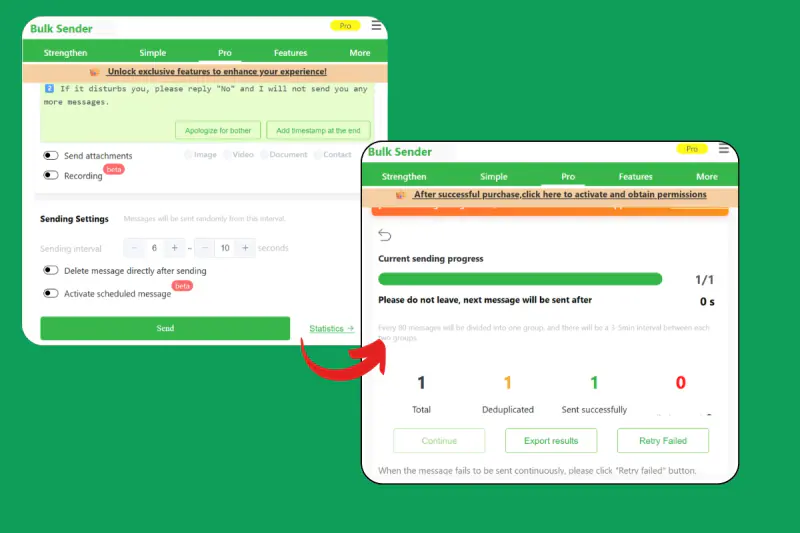
- Control pacing: add sending intervals and avoid sudden spikes that look like automated spam behavior.
- Monitor outcomes: track replies, failures, and opt-outs; adjust copy and targeting before the next batch.
Example message (template-style, personalization-ready):
"Hi {FirstName}, quick update: {OfferName} ends on {EndDate}. Want the details? Reply 1 for price, 2 for demo, or STOP to opt out."
WAPI Sender: Features That Support Real Campaigns
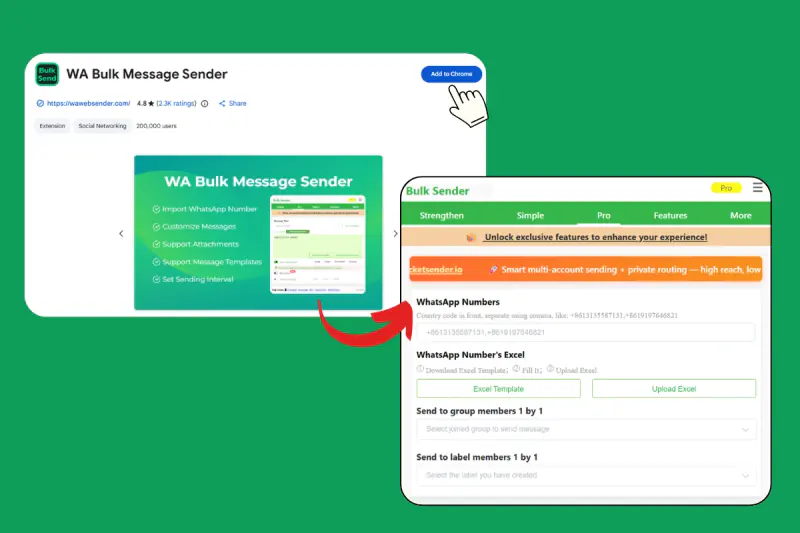
WAPI Sender is a Chrome extension workflow built around WhatsApp Web that helps you send personalized bulk messages, manage pacing, and export results for follow-up.
Download link:
WhatsApp Sender in Google
WhatsApp Sender in Edge
If you want repeatable campaigns, these features map directly to the "segment → personalize → control → measure" loop above.
WAPI Sender features:
- Send personalized message, picture, video and document.
- Send bulk WhatsApp message from excel.
- Send to group members 1 by 1.
- Save your own WhatsApp promotion message template.
- Customizable sending interval.
- Current sending progress.
- Pause and resume at any time.
- Export sending result list.
- One-click retry failed.

How to Set Up Your First Campaign
Prepare an Excel sheet with columns like Phone, FirstName, Product, City, and any custom fields you want to insert into your message template.
Then create a reusable promotion template, attach the right media (image/video/document), set a sending interval, and start a small batch first so you can validate reply quality and failure rates.
If you see failed sends, export your sending result list, fix the issues (wrong numbers, missing country codes, users not on WhatsApp), and use one-click retry failed for a clean second pass.
FAQ
Can I send WhatsApp bulk messages from Excel?
Yes, WAPI Sender supports sending bulk WhatsApp messages from Excel, which is ideal for campaigns that need personalization fields (like FirstName, Product, or LastOrder).
How do I personalize bulk messages (and avoid sending the same text to everyone)?
With WAPI Sender, you can save your own WhatsApp promotion message template and reuse it across campaigns, then insert contact-specific fields from your Excel list.
Can I send images, videos, or documents in bulk?
Yes, WAPI Sender can send personalized message, picture, video, and document, which helps when your offer needs a flyer, catalog, price list, or short demo clip.
How can I see sending progress while a campaign is running?
WAPI Sender shows current sending progress, so you can monitor what's being sent and spot issues early (like a spike in failures). If you need to adjust copy or timing mid-campaign, use pause and resume at any time instead of stopping everything and losing your place.
What should I do if some messages fail?
First, export the sending result list to identify which contacts failed and why (formatting, country code, invalid numbers, etc.). Then use one-click retry failed to resend only the failed items, which is safer and cleaner than re-sending the whole batch.